CAPAs, nonconformances and deviations each run on a template you configure, with your own fields, steps and approvals, so the process matches how your team already works.
CAPAs, NCRs and deviations
in your own flow
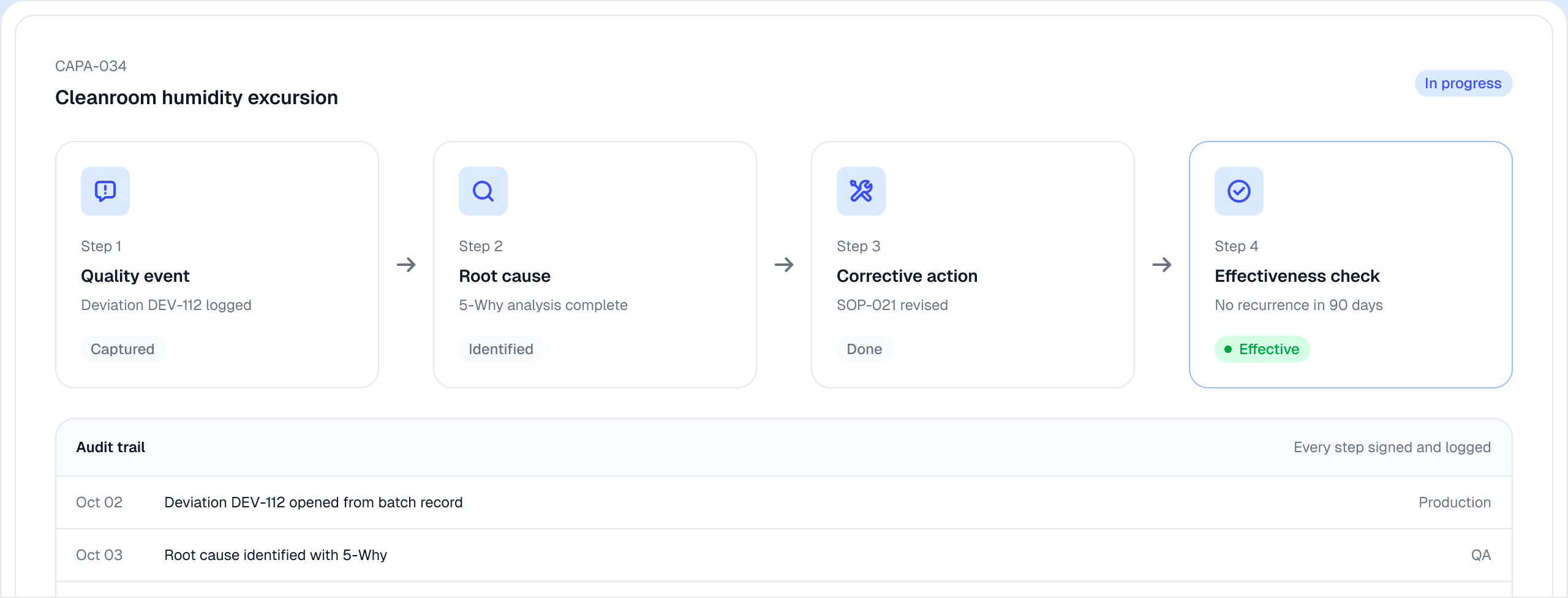
Log the event the day it happens, find root cause, assign corrective actions and verify they worked, with each approval in the audit trail.
Every event type, run your way.

Escalation that keeps the history.

Root causes that show the pattern.

Proof the fix worked.

No due date moves without a reason.

Platform connections
Zendesk and Intercom
Qualio reads the complaints your support team already logs there, so each one can be raised as a quality event without changing anything in the support tool.
Traceability
Each event links to the products, suppliers, documents and other events involved, so you can trace a CAPA to everything it touched from the CAPA itself.
Frequently Asked Questions
What is a CAPA?
A CAPA is a corrective and preventive action: the work a company does to fix the cause of a problem and stop it happening again. It usually starts from a nonconformance, deviation, complaint or audit finding, and ends when someone verifies the fix worked. Qualio tracks each step on one CAPA, from the event to verified effectiveness.
What are the steps in a CAPA process?
A typical CAPA has four steps. You capture the event, investigate the root cause, carry out the corrective and preventive actions and verify they worked, and the CAPA closes once the fix is approved. In Qualio each step is tracked on the same CAPA, with its owner, due date and audit trail.
What is the difference between a CAPA and a nonconformance?
A nonconformance records that something did not meet a requirement. A CAPA is the action taken to remove the cause so the problem does not return. A nonconformance can lead to a CAPA when its cause needs fixing, and Qualio keeps both in the same place.
How do you verify that a CAPA was effective?
Effectiveness verification checks, after the corrective action is done, that the problem has not come back, for example no recurrence over an agreed period. In Qualio the effectiveness check links back to the original event and corrective action, so the proof stays with the CAPA.
What should CAPA software include?
CAPA software should cover the whole path from event to verified fix. That means capturing events such as nonconformances, deviations and complaints, supporting root cause analysis, assigning and escalating corrective actions, verifying effectiveness and keeping a complete audit trail. Qualio does each of these in one place.
See CAPA management in Qualio
Pick a CAPA and watch it move from intake to root cause to verified fix.